



Tagbox which creatives use to manage, organise and easily find their visual assets have introduced a new search-in-video tool which uses AI to create easy to use search and custom filters.
They say: AI search has always been the heart of Tagbox – the ability to type “men running on the beach” and instantly find the right photo across thousands of files. It’s probably our most loved feature.’ – This has now been launched for video.
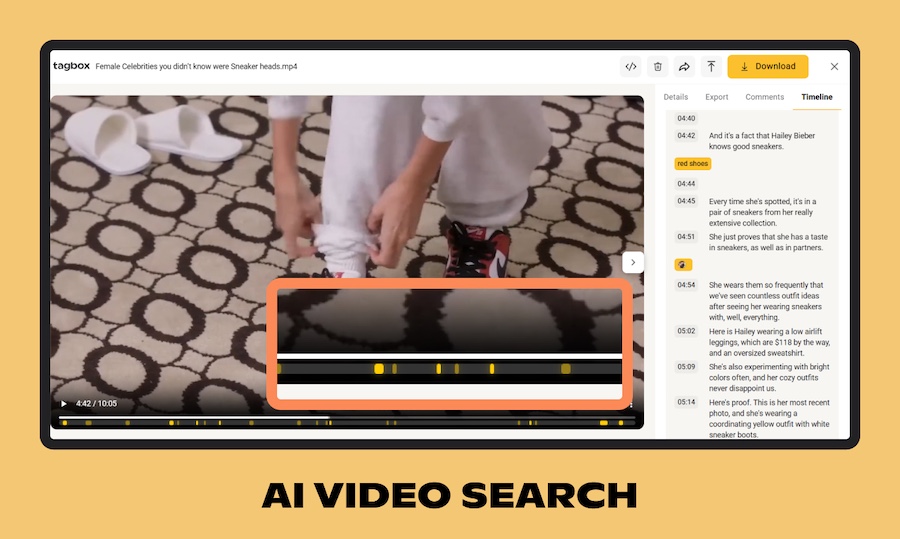
‘Search from the main bar and Tagbox will now look inside the actual video content – not just file names or transcriptions, but the visuals themselves. Matching moments show up as markers on your timeline, so you can jump straight to the right scene without scrubbing through hours of footage.’
‘If you manage a lot of video content – especially for social media – this is going to change your workflow completely.’
‘When a match is found, you’ll see a new Search track on your video timeline – right alongside the transcription and people tracks you already know. On it, you’ll notice two types of markers: bright highlights for high-confidence matches, and softer ones for possible matches that we surface just in case. This way you can jump straight to the moments that matter, without scrubbing through hours of footage.’
And for better navigation – ‘you can now use your browser’s back and forward buttons to move between screens – something that sounds basic, but wasn’t possible until now. On top of that, your current view – including any tag filters you’ve applied – is now reflected in the URL. That means you can bookmark a filtered view, or share a direct link with your team and they’ll land on exactly what you see.’
Learn more and give it a go here.